PMU State Estimation
In this example, we analyze a 6-bus power system, shown in Figure 1. The goal is to estimate bus voltage magnitudes and angles from phasor measurements only.
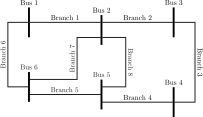
Figure 1: The 6-bus power system.
Users can download a Julia script containing the scenarios from this section using the following link.
We define the power system by adding buses, branches, and a generator at the slack bus:
system, monitoring = ems()

addBus!(system; label = "Bus 1", type = 3)
addBus!(system; label = "Bus 2")
addBus!(system; label = "Bus 3")
addBus!(system; label = "Bus 4")
addBus!(system; label = "Bus 5")
addBus!(system; label = "Bus 6")

@branch(resistance = 0.02)
addBranch!(system; label = "Branch 1", from = "Bus 1", to = "Bus 2", reactance = 0.05)
addBranch!(system; label = "Branch 2", from = "Bus 2", to = "Bus 3", reactance = 0.23)
addBranch!(system; label = "Branch 3", from = "Bus 3", to = "Bus 4", reactance = 0.19)
addBranch!(system; label = "Branch 4", from = "Bus 4", to = "Bus 5", reactance = 0.17)
addBranch!(system; label = "Branch 5", from = "Bus 5", to = "Bus 6", reactance = 0.04)
addBranch!(system; label = "Branch 6", from = "Bus 1", to = "Bus 6", reactance = 0.21)
addBranch!(system; label = "Branch 7", from = "Bus 2", to = "Bus 6", reactance = 0.13)
addBranch!(system; label = "Branch 8", from = "Bus 5", to = "Bus 2", reactance = 0.34)

addGenerator!(system; label = "Generator 1", bus = "Bus 1")
Display Data Settings
Before running simulations, we configure which data elements to display:
show = Dict("Shunt Power" => false, "Status" => false, "Series Power" => false)Optimal PMU Placement
Next, we assign PMUs to the power system using an optimal placement strategy that ensures observability with the minimum number of PMUs:
placement = pmuPlacement(monitoring, HiGHS.Optimizer; verbose = 1)EXIT: The optimal solution was found.This gives the bus locations where PMUs should be installed:
julia> placement.busOrderedCollections.OrderedDict{String, Int64} with 2 entries:
  "Bus 2" => 2
  "Bus 5" => 5
PMUs installed at these buses measure bus voltage phasors and all currents in branches connected to those buses. The corresponding branch current phasors are:
julia> placement.fromOrderedCollections.OrderedDict{String, Int64} with 4 entries: "Branch 2" => 2 "Branch 7" => 7 "Branch 5" => 5 "Branch 8" => 8julia> placement.toOrderedCollections.OrderedDict{String, Int64} with 3 entries: "Branch 1" => 1 "Branch 8" => 8 "Branch 4" => 4
When phasor measurement values are generated from optimal power flow or power flow analysis, the integers in bus and branch labels indicate the vector positions where these values are stored.
Figure 2 shows the resulting phasor measurement configuration, including bus voltage and branch current phasor measurements.
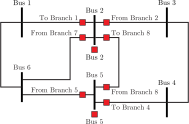
Figure 2: The 6-bus power system with phasor measurement configuration.
Finally, we define the phasor measurements. The remaining question is how to obtain their values. In this example, we use AC power flow results to generate synthetic measurements.
AC Power Flow
AC power flow analysis requires generator and load data. Figure 3 shows the system configuration.
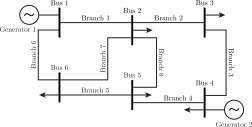
Figure 3: The 6-bus power system with generators and loads.
We add load and generator data as follows:
updateBus!(system; label = "Bus 2", type = 1, active = 0.217, reactive = 0.127)
updateBus!(system; label = "Bus 3", type = 1, active = 0.478, reactive = -0.039)
updateBus!(system; label = "Bus 4", type = 2, active = 0.076, reactive = 0.016)
updateBus!(system; label = "Bus 5", type = 1, active = 0.112, reactive = 0.075)
updateBus!(system; label = "Bus 6", type = 1, active = 0.295, reactive = 0.166)

updateGenerator!(system; label = "Generator 1", active = 2.324, reactive = -0.169)
addGenerator!(system; label = "Generator 2", bus = "Bus 4", active = 0.412, reactive = 0.234)
Next, we run AC power flow analysis to obtain bus voltages:
acModel!(system)

powerFlow = newtonRaphson(system)
powerFlow!(powerFlow; verbose = 1)
EXIT: The solution was found using the Newton-Raphson method in 3 iterations.Bus Voltage Phasor Measurements
To obtain bus voltage phasor measurements, we use the exact values and optimal PMU placement data. Setting noise = true adds white Gaussian noise with the default variance of 1e-8 to the magnitude and angle values:
@pmu(label = "!")
for (bus, idx) in placement.bus
    Vᵢ, θᵢ = powerFlow.voltage.magnitude[idx], powerFlow.voltage.angle[idx]
    addPmu!(monitoring; bus = bus, magnitude = Vᵢ, angle = θᵢ, noise = true)
end
Branch Current Phasor Measurements
To add branch current phasor measurements, we first compute current magnitudes and angles, then use those values to form measurements. Here, the exact values are used because the noise keyword is ignored:
for branch in keys(placement.from)
    Iᵢⱼ, ψᵢⱼ = fromCurrent(powerFlow; label = branch)
    addPmu!(monitoring; from = branch, magnitude = Iᵢⱼ, angle = ψᵢⱼ)
end
for branch in keys(placement.to)
    Iⱼᵢ, ψⱼᵢ = toCurrent(powerFlow; label = branch)
    addPmu!(monitoring; to = branch, magnitude = Iⱼᵢ, angle = ψⱼᵢ)
end
Current phasor measurements can also be generated like voltage phasors by calling the current! function after AC state estimation has converged.
Bus voltage and branch current measurements can also be formed by calling the pmuPlacement! function, as shown in the PMU State Estimation manual.
Phasor Measurements
Finally, we inspect the complete phasor measurement set shown in Figure 2:
printPmuData(monitoring; width = Dict("Label" => 15))|-----------------------------------------------------------------------------------|
| PMU Data |
|-----------------------------------------------------------------------------------|
| Label | Voltage Magnitude | Voltage Angle |
| | | |
| | Measurement | Variance | Status | Measurement | Variance | Status |
| | [pu] | [pu] | | [rad] | [rad] | |
|---------------|-------------|----------|--------|-------------|----------|--------|
| Bus 2 | 0.9818 | 1.00e-08 | 1 | -0.0270 | 1.00e-08 | 1 |
| Bus 5 | 0.9782 | 1.00e-08 | 1 | -0.0409 | 1.00e-08 | 1 |
|-----------------------------------------------------------------------------------|
|-----------------------------------------------------------------------------------|
| PMU Data |
|-----------------------------------------------------------------------------------|
| Label | Current Magnitude | Current Angle |
| | | |
| | Measurement | Variance | Status | Measurement | Variance | Status |
| | [pu] | [pu] | | [rad] | [rad] | |
|---------------|-------------|----------|--------|-------------|----------|--------|
| From Branch 2 | 0.2282 | 1.00e-08 | 1 | 0.1829 | 1.00e-08 | 1 |
| From Branch 7 | 0.1058 | 1.00e-08 | 1 | -0.3102 | 1.00e-08 | 1 |
| From Branch 5 | 0.0508 | 1.00e-08 | 1 | -1.5712 | 1.00e-08 | 1 |
| From Branch 8 | 0.0414 | 1.00e-08 | 1 | 2.8992 | 1.00e-08 | 1 |
| To Branch 1 | 0.5984 | 1.00e-08 | 1 | 2.9124 | 1.00e-08 | 1 |
| To Branch 8 | 0.0414 | 1.00e-08 | 1 | -0.2424 | 1.00e-08 | 1 |
| To Branch 4 | 0.1413 | 1.00e-08 | 1 | 2.0979 | 1.00e-08 | 1 |
|-----------------------------------------------------------------------------------|Base Case Analysis
Once the measurements are defined, we create the state estimation model:
analysis = pmuStateEstimation(monitoring)Next, we solve the model to obtain the WLS estimate for bus voltages and compute the resulting powers:
stateEstimation!(analysis; power = true, verbose = 1)EXIT: The solution of the PMU state estimation was found.We can inspect the estimated bus voltages together with the corresponding power values:
printBusData(analysis; show)|-------------------------------------------------------------------------------------------|
| Bus Data |
|-------------------------------------------------------------------------------------------|
| Label | Voltage | Power Generation | Power Demand | Power Injection |
| | | | | |
| Bus | Magnitude | Angle | Active | Reactive | Active | Reactive | Active | Reactive |
| | [pu] | [rad] | [pu] | [pu] | [pu] | [pu] | [pu] | [pu] |
|-------|-----------|---------|---------|----------|--------|----------|---------|----------|
| Bus 1 | 1.0000 | -0.0001 | 0.7773 | 0.2348 | 0.0000 | 0.0000 | 0.7773 | 0.2348 |
| Bus 2 | 0.9819 | -0.0270 | -0.0000 | 0.0000 | 0.2170 | 0.1270 | -0.2170 | -0.1270 |
| Bus 3 | 0.9897 | -0.0798 | 0.0000 | 0.0000 | 0.4780 | -0.0390 | -0.4780 | 0.0390 |
| Bus 4 | 1.0000 | -0.0303 | 0.4120 | 0.1687 | 0.0760 | 0.0160 | 0.3360 | 0.1527 |
| Bus 5 | 0.9782 | -0.0409 | -0.0000 | 0.0000 | 0.1120 | 0.0750 | -0.1120 | -0.0750 |
| Bus 6 | 0.9761 | -0.0399 | -0.0000 | 0.0000 | 0.2950 | 0.1660 | -0.2950 | -0.1660 |
|-------------------------------------------------------------------------------------------|We can also compare these results with those obtained from AC power flow:
power!(powerFlow)
printBusData(powerFlow; show)
|------------------------------------------------------------------------------------------|
| Bus Data |
|------------------------------------------------------------------------------------------|
| Label | Voltage | Power Generation | Power Demand | Power Injection |
| | | | | |
| Bus | Magnitude | Angle | Active | Reactive | Active | Reactive | Active | Reactive |
| | [pu] | [rad] | [pu] | [pu] | [pu] | [pu] | [pu] | [pu] |
|-------|-----------|---------|--------|----------|--------|----------|---------|----------|
| Bus 1 | 1.0000 | 0.0000 | 0.7773 | 0.2349 | 0.0000 | 0.0000 | 0.7773 | 0.2349 |
| Bus 2 | 0.9819 | -0.0269 | 0.0000 | 0.0000 | 0.2170 | 0.1270 | -0.2170 | -0.1270 |
| Bus 3 | 0.9898 | -0.0798 | 0.0000 | 0.0000 | 0.4780 | -0.0390 | -0.4780 | 0.0390 |
| Bus 4 | 1.0000 | -0.0302 | 0.4120 | 0.1687 | 0.0760 | 0.0160 | 0.3360 | 0.1527 |
| Bus 5 | 0.9782 | -0.0408 | 0.0000 | 0.0000 | 0.1120 | 0.0750 | -0.1120 | -0.0750 |
| Bus 6 | 0.9761 | -0.0398 | 0.0000 | 0.0000 | 0.2950 | 0.1660 | -0.2950 | -0.1660 |
|------------------------------------------------------------------------------------------|We can also inspect the estimated branch power flows:
printBranchData(analysis; show)|------------------------------------------------------------------------|
| Branch Data |
|------------------------------------------------------------------------|
| Label | From-Bus Power | To-Bus Power |
| | | |
| Branch | From-Bus | To-Bus | Active | Reactive | Active | Reactive |
| | | | [pu] | [pu] | [pu] | [pu] |
|----------|----------|--------|---------|----------|---------|----------|
| Branch 1 | Bus 1 | Bus 2 | 0.5827 | 0.1359 | -0.5756 | -0.1180 |
| Branch 2 | Bus 2 | Bus 3 | 0.2191 | -0.0467 | -0.2181 | 0.0587 |
| Branch 3 | Bus 3 | Bus 4 | -0.2599 | -0.0196 | 0.2613 | 0.0328 |
| Branch 4 | Bus 4 | Bus 5 | 0.0747 | 0.1199 | -0.0743 | -0.1165 |
| Branch 5 | Bus 5 | Bus 6 | 0.0020 | 0.0496 | -0.0020 | -0.0495 |
| Branch 6 | Bus 1 | Bus 6 | 0.1945 | 0.0989 | -0.1936 | -0.0889 |
| Branch 7 | Bus 2 | Bus 6 | 0.0997 | 0.0290 | -0.0995 | -0.0276 |
| Branch 8 | Bus 5 | Bus 2 | -0.0397 | -0.0081 | 0.0397 | 0.0087 |
|------------------------------------------------------------------------|Modifying Measurement Data
Next, we update measurement values and variances. Instead of recreating the measurement set and PMU state estimation model, we modify both simultaneously:
updatePmu!(analysis; label = "From Branch 8", magnitude = 1.1)
updatePmu!(analysis; label = "From Branch 2", angle = 0.2, noise = true)
These updates show how JuliaGrid can modify individual measurement fields. For the phasor measurement at From Branch 8, only the magnitude changes, while the angle remains the same. For From Branch 2, only the angle is updated by adding white Gaussian noise, while the magnitude remains unchanged.
Next, we solve the PMU state estimation again to compute the new estimate:
stateEstimation!(analysis; power = true, verbose = 1)EXIT: The solution of the PMU state estimation was found.We can now inspect the bus data:
printBusData(analysis; show)|-------------------------------------------------------------------------------------------|
| Bus Data |
|-------------------------------------------------------------------------------------------|
| Label | Voltage | Power Generation | Power Demand | Power Injection |
| | | | | |
| Bus | Magnitude | Angle | Active | Reactive | Active | Reactive | Active | Reactive |
| | [pu] | [rad] | [pu] | [pu] | [pu] | [pu] | [pu] | [pu] |
|-------|-----------|---------|---------|----------|--------|----------|---------|----------|
| Bus 1 | 1.0024 | 0.0183 | 0.9477 | 0.2633 | 0.0000 | 0.0000 | 0.9477 | 0.2633 |
| Bus 2 | 0.9838 | -0.0082 | 0.3810 | -0.0038 | 0.2170 | 0.1270 | 0.1640 | -0.1308 |
| Bus 3 | 0.9916 | -0.0610 | 0.1923 | -0.0092 | 0.4780 | -0.0390 | -0.2857 | 0.0298 |
| Bus 4 | 0.9985 | -0.0487 | 0.2200 | 0.1640 | 0.0760 | 0.0160 | 0.1440 | 0.1480 |
| Bus 5 | 0.9768 | -0.0597 | -0.1058 | 0.0308 | 0.1120 | 0.0750 | -0.2178 | -0.0442 |
| Bus 6 | 0.9735 | -0.0582 | -0.4422 | -0.0082 | 0.2950 | 0.1660 | -0.7372 | -0.1742 |
|-------------------------------------------------------------------------------------------|With the updated measurement values, the estimates deviate more from the exact values obtained through AC power flow because the modified measurements no longer align with them.
Modifying Measurement Set
Excluding phasor measurements obtained from optimal placement should be done with caution because it can easily make the system unobservable. In this example, we set two measurements out-of-service and immediately add two measurements to maintain observability:
updatePmu!(monitoring; label = "From Branch 2", status = 0)
updatePmu!(monitoring; label = "From Branch 8", status = 0)

addPmu!(monitoring; to = "Branch 2", magnitude = 0.2282, angle = -2.9587)
addPmu!(monitoring; to = "Branch 8", magnitude = 0.0414, angle = -0.2424)
Because new measurements are added, analysis is not passed to these functions. Directly modifying the existing PMU state estimation model is not possible in this case. To do this, define the new measurements beforehand with status = 0 and then activate them by setting status = 1.
Next, we create and solve the PMU state estimation model:
analysis = pmuStateEstimation(monitoring)
stateEstimation!(analysis; power = true, verbose = 1)
EXIT: The solution of the PMU state estimation was found.We can now inspect the bus data:
printBusData(analysis; show)|-------------------------------------------------------------------------------------------|
| Bus Data |
|-------------------------------------------------------------------------------------------|
| Label | Voltage | Power Generation | Power Demand | Power Injection |
| | | | | |
| Bus | Magnitude | Angle | Active | Reactive | Active | Reactive | Active | Reactive |
| | [pu] | [rad] | [pu] | [pu] | [pu] | [pu] | [pu] | [pu] |
|-------|-----------|---------|---------|----------|--------|----------|---------|----------|
| Bus 1 | 1.0000 | -0.0001 | 0.7773 | 0.2348 | 0.0000 | 0.0000 | 0.7773 | 0.2348 |
| Bus 2 | 0.9819 | -0.0270 | -0.0000 | 0.0000 | 0.2170 | 0.1270 | -0.2170 | -0.1270 |
| Bus 3 | 0.9897 | -0.0798 | 0.0000 | 0.0000 | 0.4780 | -0.0390 | -0.4780 | 0.0390 |
| Bus 4 | 1.0000 | -0.0303 | 0.4120 | 0.1687 | 0.0760 | 0.0160 | 0.3360 | 0.1527 |
| Bus 5 | 0.9782 | -0.0409 | -0.0000 | 0.0000 | 0.1120 | 0.0750 | -0.1120 | -0.0750 |
| Bus 6 | 0.9761 | -0.0399 | -0.0000 | 0.0000 | 0.2950 | 0.1660 | -0.2950 | -0.1660 |
|-------------------------------------------------------------------------------------------|Taking some measurements out-of-service affects the estimate. Adding more precise measurements while maintaining observability gives an estimate that more accurately reflects the exact power system state.